The NHS Capacity Tracker is a web-based platform that helps adult social care providers in England share up-to-date information about their service, including care capacity, workforce pressures and, where relevant, vacancies.
Care homes, domiciliary care providers, hospices and other services use it so health and social care teams can understand available support and plan safer, faster discharges.
For many CQC-regulated adult social care providers, completing the required NHS Capacity Tracker return is mandatory. Providers must review and submit the required information during the monthly reporting window, which normally runs from the 8th to the 14th of each month.
Even when nothing has changed, the provider still needs to review the required fields and save the return so the system records the update.
For a care business, Capacity Tracker should not sit at the bottom of the monthly admin list. Accurate updates help your team show genuine availability, reduce avoidable calls about vacancies, and support discharge teams when they need to find the right care option quickly.
It also helps your business stay on top of its reporting responsibilities before a missed deadline becomes a compliance issue.

What Is the NHS Capacity Tracker?
The NHS Capacity Tracker is a secure, web-based platform that gives health and social care teams a clearer picture of adult social care capacity across England.
Care providers use it to update key information about their service, while local authorities, NHS teams and commissioners use that information to understand available support and system pressures.
For a care provider, the platform does more than collect figures. It helps your service show its current position to the professionals who may need to place or support people quickly.
When your team keeps information accurate, discharge teams can identify suitable care options with less reliance on repeated phone calls and outdated vacancy lists.
The NHS England Capacity Tracker supports national and local oversight of adult social care. It brings together provider-level information so the wider system can monitor issues such as care-home capacity, workforce pressures and service demand.
The NHS standards directory describes it as a tool that helps assess key aspects of adult social care provision at both national and local level.
For care homes, the NHS care home capacity tracker can help make vacancy information more visible to teams arranging discharge or onward care. This is why some people also refer to it as an NHS bed capacity tracker. However, the platform covers more than beds. It also supports wider adult social care reporting and planning.
From a business perspective, treat Capacity Tracker as part of your monthly operating routine. Your updates help the wider care system understand what your service can provide, while also helping your organisation keep its required data current.
RELATED: What Is a Tender in Health and Social Care? 2026 Update
Is NHS Capacity Tracker Mandatory for Care Providers?
For most CQC-regulated adult social care providers in England, NHS Capacity Tracker reporting is mandatory. The legal requirement has applied since 31 July 2022 and continues unless the Department of Health and Social Care changes or withdraws the formal notice.
This includes many care homes and home-care services, whether they support privately funded people, local-authority-funded people or NHS-funded people. Provider size does not remove the requirement. A small service still needs a reliable process for checking and submitting its monthly information.
Your team should also avoid assuming that a quiet month means no action is needed. If your service has no current vacancies, no active service users, or little operational change, you may still need to review the required fields and submit the appropriate return. Capacity Tracker uses this information to build an accurate national and local picture of adult social care capacity.
For a caregiver business, the simplest approach is to treat the NHS Capacity Tracker mandatory return like any other core compliance task.
Give one named person responsibility for the update, appoint a backup user, and set an internal deadline before the final reporting date. This reduces the risk of missed submissions when managers are on leave, staff change roles, or your service faces unexpected pressures.
When Do Providers Need to Submit Their Monthly Return?
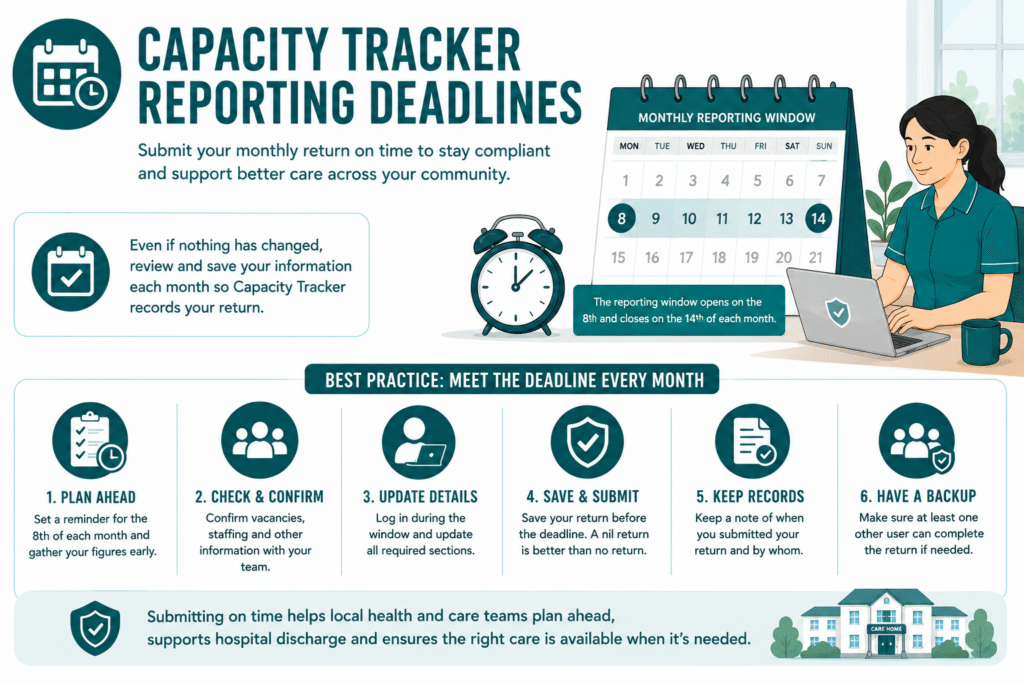
Care providers must submit their required NHS Capacity Tracker information during a seven-day reporting window each month. The window opens on the 8th and closes at the end of the 14th. If the 14th falls on a weekend or public holiday, providers can submit by the next working day.
Do not wait until the final day. A rushed update creates avoidable problems, especially when your manager is off duty, staffing levels change quickly, or someone cannot access the system. Set an internal deadline, such as the 10th or 11th of every month, so your team has time to check figures and resolve login issues.
Your team should review the required fields even when nothing has changed. Capacity Tracker records the update only when you save the return during that month’s reporting window. This means a service with stable occupancy, no vacancies or no major staffing changes still needs to complete the monthly check.
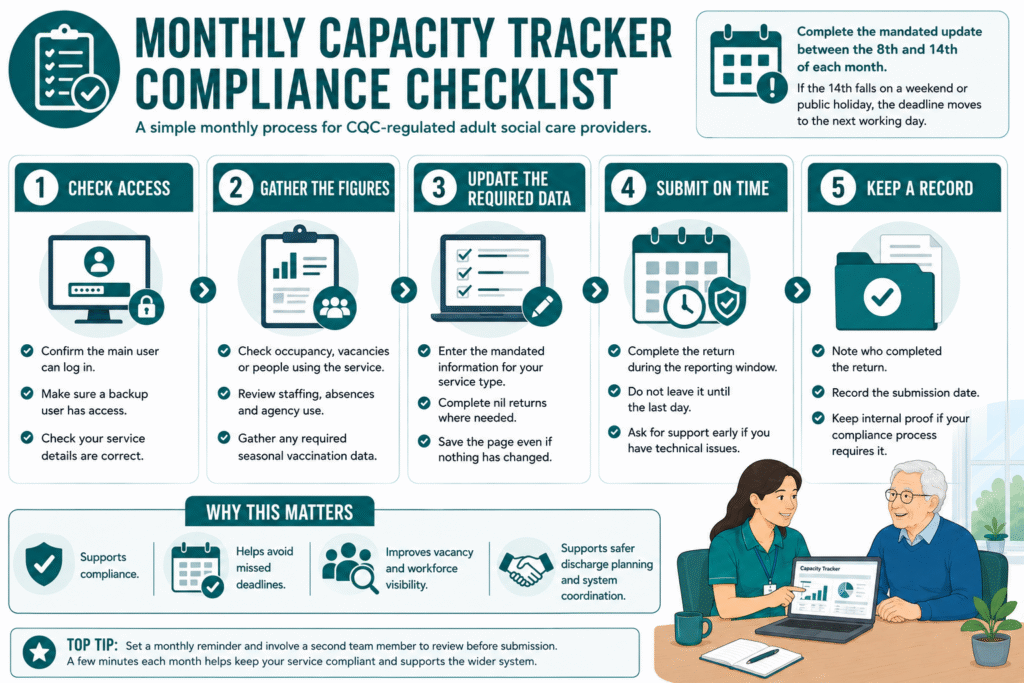
A simple routine works best:
- Ask the responsible manager to confirm current occupancy, vacancies, staffing and service information.
- Compare the figures with your latest rota, admissions, discharges and care records.
- Update the required fields in Capacity Tracker.
- Save the submission before your internal deadline.
- Keep a short record of who completed the return and when.
By treating the update as a fixed monthly compliance task, your care business can avoid last-minute pressure and keep its information reliable for health and social care teams.
READ MORE: Mock CQC Inspection: A Practical 2026 Checklist for Care Providers
What Information Do Care Homes and Home Care Providers Need to Update?
The information your service needs to submit depends on the type of care you provide. Capacity Tracker collects a core monthly dataset from adult social care providers, while some questions may change over time to reflect national priorities.
For that reason, your manager should always check the live NHS Capacity Tracker guidance before completing each return.
NHS Care Home Capacity Tracker Information
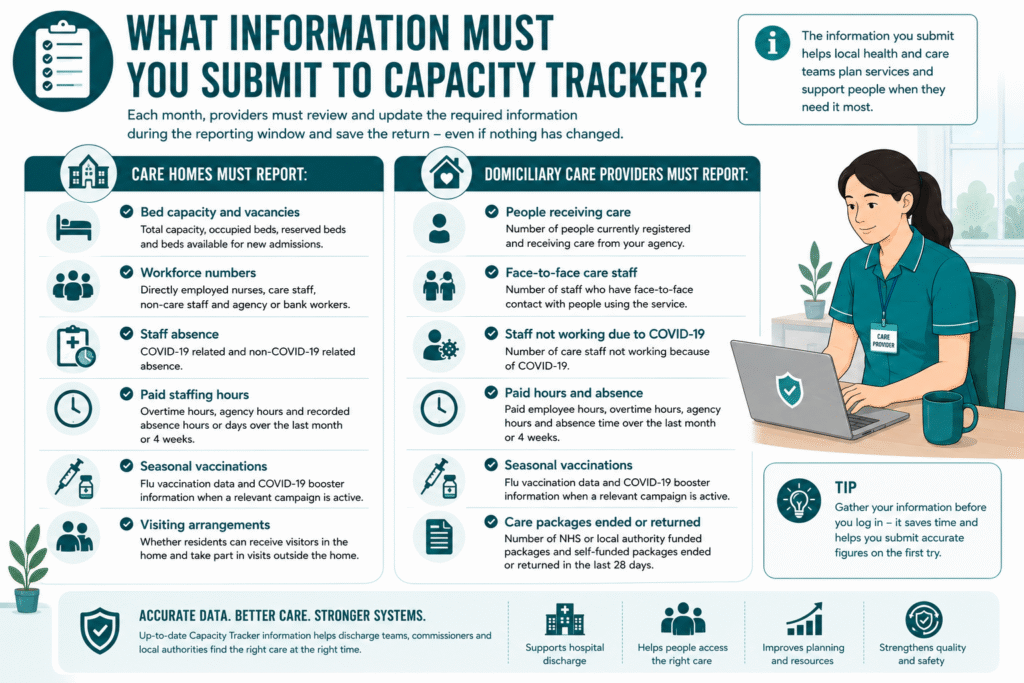
For care homes, the monthly update can include information such as:
- Current occupancy and the number of residents in the home
- Available beds and whether those beds can accept admissions
- Visiting arrangements
- Workforce absence information
- Seasonal vaccination information when required
These updates help health and social care teams understand local care-home capacity. When your service records vacancies accurately, discharge teams can see whether your home may be able to support someone leaving hospital.
Information for Home Care Providers
Home care and domiciliary care providers report different operational information because they do not manage care-home beds. Your return may include:
- The number of people receiving regulated domiciliary care
- Workforce absence information
- Seasonal vaccination information when required
- Other service-level information included in the current monthly data set
Your team should use the most recent rota, service-user records and operational reports when checking the figures. Do not estimate where you can confirm the information from your own records.
The most important point is accuracy. Capacity Tracker data supports national and local planning, but it also affects how other professionals understand your service.
A prompt, accurate update gives commissioners and discharge teams a clearer view of what your care business can offer at that time.
Why Accurate Capacity Tracker Updates Matter to Your Care Business
Accurate Capacity Tracker updates do more than meet a monthly requirement. They help health and social care teams understand what your service can offer right now.
When your care home records a genuine vacancy, discharge teams can see that information while they look for suitable support for someone leaving hospital.
When your home care service updates its capacity and staffing position, commissioners and local teams can make better decisions about available care in the community.
This can reduce repeated calls, outdated vacancy lists and wasted time for your staff. Instead of answering the same availability questions throughout the day, your team can focus on care delivery while the wider system works from a more reliable picture.
Accurate updates also protect your business reputation. If Capacity Tracker shows that you have space, staffing capacity or a service offer that no longer reflects reality, referral teams may contact you about placements you cannot accept. The opposite can also happen: an out-of-date return may hide genuine availability that your business could fill.
For example, a care home with two suitable vacancies may miss potential referrals if its information still shows full occupancy. A home care provider may also receive unsuitable requests if its workforce information does not reflect current capacity.
Your monthly return helps the wider system plan safer and more timely discharges, but it also gives your care business a chance to present an accurate picture of its service. Treat the update as part of your referral, occupancy and workforce-management routine, not just another compliance form.
SEE ALSO: What Are the CQC Fundamental Standards? 2026 Update
NHS Capacity Tracker Register and Login: Getting Your Team Set Up
Your care business needs reliable access to Capacity Tracker before the monthly reporting window opens. Do not leave registration or login issues until the 8th of the month, when your team may already be managing admissions, staffing gaps and day-to-day care delivery.
To use the platform, start with the NHS Capacity Tracker register process on the official Capacity Tracker website. The site provides registration guidance for different provider types, including care homes, hospices and other health and care services. Once your organisation is set up, authorised users can access the system through the NHS Capacity Tracker login page.
Your business should not rely on one manager’s account. Give at least two trusted people access, such as the registered manager and a deputy, administrator or compliance lead. This protects your monthly process when someone is on annual leave, unwell or leaves the organisation.
Keep your user details current as well. If a manager leaves, contact the NHS Capacity Tracker team promptly so they can update access and prevent avoidable delays.
The support team can help with registration, password resets, user setup and technical questions. Current support details list telephone support on 0191 691 3729 and email support at necsu.capacitytracker@nhs.net.
A simple rule works well: check that your login works before the reporting window opens. That small step can save your care service from a last-minute compliance problem.
What Happens If You Miss the Capacity Tracker Deadline?
Missing the monthly Capacity Tracker deadline does not usually lead straight to a financial penalty. The process starts with support.
The relevant team will normally contact your service, explain what is missing and give you the chance to resolve the issue before the next reporting window.
However, your care business should take repeated missed returns seriously. Private CQC-regulated adult social care providers can face enforcement action if they fail to provide required information without a reasonable excuse, or if they submit information that is materially false or misleading.
The enforcement process can move through several stages:
- Support and contact: Your service receives guidance and help to complete the return.
- Further support: If the issue continues, the team may contact you again before the next deadline.
- Notice of intent: Persistent non-compliance can lead to a formal warning that a penalty may follow.
- Final decision: After considering any explanation or formal representation, the Department of Health and Social Care may issue a financial penalty.
Your team should respond early if a technical problem, emergency or staffing crisis prevents submission. Keep records of the issue, contact the support team and explain what happened.
A reasonable excuse may apply in some circumstances, but silence or repeated missed returns without engagement can make the situation harder to resolve.
The best protection is a simple monthly routine: assign ownership, keep backup users, check your NHS Capacity Tracker login before the reporting window opens and submit before your internal deadline.
MORE: What Is an Unregulated Care Provider? 2026 Update
Monthly NHS Capacity Tracker Checklist for Care Providers
A clear routine makes Capacity Tracker easier to manage. Use this checklist each month so your team can complete the return accurately and on time.
- Check the reporting window.
Confirm that the monthly submission period has opened and note your internal deadline. - Review current occupancy or service-user numbers.
Care homes should check resident numbers, vacancies and beds available for admission. Home care providers should confirm the number of people receiving regulated care. - Confirm workforce information.
Check staff absences, rota changes and any other required workforce details against your latest records. - Review any seasonal or additional questions.
Some Capacity Tracker questions change during the year, so check the live guidance rather than relying on last month’s return. - Update the information from reliable records.
Use your care-management system, rota, occupancy records and staffing reports. Do not guess when your team can verify the figures. - Save and submit the return.
Make sure the system records the update before your internal deadline, even when no figures have changed. - Keep a completion record.
Note who completed the return, when they submitted it, and whether any issue needs follow-up. - Resolve access problems early.
If a user cannot log in or the data looks incorrect, contact the NHS Capacity Tracker team before the deadline rather than waiting until the last day.
For most care businesses, assigning this task to one named owner and one backup user will keep the process simple. A five-minute check early in the reporting window can prevent a missed return, reduce unnecessary stress and keep your service information useful for referral and discharge teams.
Make Capacity Tracker Part of Your Monthly Compliance Routine
NHS Capacity Tracker works best when your care business treats it as part of its normal monthly routine, not as a last-minute task. The same figures that support your return can also help you manage occupancy, staffing pressure, vacancies and referral opportunities.
Give one person clear responsibility for the update, keep a backup user in place and set an internal deadline before the 14th. This gives your team time to check the information properly, solve login issues and avoid rushed submissions.
Accurate updates also help the wider health and care system make better decisions. When discharge teams and commissioners can see a realistic picture of your service, they can identify suitable care options more quickly and reduce unnecessary delays.
For care providers, the goal is simple: keep your information current, submit on time and make Capacity Tracker part of the same compliance rhythm as rota checks, audits and service reviews.
Need help keeping your care service compliant and inspection-ready?
Care Sync Experts can help you strengthen your monthly compliance systems, identify gaps in your evidence and build a practical improvement plan that supports safer care, smoother reporting and greater confidence ahead of CQC inspection.
FAQ
What Does Capacity Mean in the NHS?
In the NHS and adult social care, capacity usually means the resources available to meet people’s needs at a particular time. This can include available care-home beds, home-care hours, staff availability, specialist services, equipment and community support.
For Capacity Tracker purposes, providers use the term mainly to describe whether their service has room and resources to accept or support more people safely. A care home may have an empty bed but still lack capacity to accept a person if it does not have the right staffing, skills or environment for their needs.
What Is Capacity and Capability in the NHS?
Capacity describes how much care or support a service can provide. Capability describes whether the service has the right skills, knowledge, staff mix and resources to provide that care safely.
For example, a care home may have two vacant rooms, which gives it physical capacity. However, it may not have the capability to support someone with complex dementia, PEG feeding needs or a high level of nursing care. Safe discharge planning needs both capacity and capability.
What Is the Difference Between the NHS and NHS England?
The NHS is the wider publicly funded health service that provides healthcare across England, Scotland, Wales and Northern Ireland. It includes hospitals, GP practices, ambulance services, community services and many other organisations.
NHS England is the organisation that leads and oversees the NHS in England. It works with local NHS bodies, integrated care systems and providers to plan services, set national priorities and support the delivery of care.
Capacity Tracker supports adult social care and health-system planning in England, which is why people may refer to it as the NHS England Capacity Tracker.
What Are the Four Criteria for Capacity?
In adult social care, this question usually refers to mental capacity rather than care-service capacity. Under the Mental Capacity Act 2005, a person must be able to:
– Understand the information relevant to a decision.
– Retain that information long enough to make the decision.
– Use or weigh that information as part of the decision-making process.
– Communicate their decision in any way.
These criteria relate to a person’s ability to make a specific decision at a specific time. They are different from Capacity Tracker, which records a care provider’s operational capacity and service information.
Leave a Reply