The Care Quality Commission (CQC) has, since July 1st, 2025, changed how it handles new homecare applications, and the impact has been brutal for unprepared providers.
CQC now routinely returns and rejects incomplete or inaccurate domiciliary care applications at the point of receipt. When that happens, any resubmission counts as a brand-new application. You lose your place in the queue. You start again from the back. In some cases, that mistake adds months to your launch timeline.
This single procedural change in CQC registration for domiciliary care providers explains why so many new CQC domiciliary care applications are failing right now.

The rules did not get easier.
CQC raised the bar, deliberately.
Most online guides still teach the old approach:
- “Submit what you have and fix issues later.”
- “CQC will come back with questions.”
- “Minor errors won’t matter.”
That advice is now dangerous.
CQC no longer treats missing documents, outdated forms, or vague answers as fixable issues. They treat them as grounds for immediate rejection.
If your application fails at intake:
- CQC does not correct it with you
- CQC does not hold your place
- CQC applies whatever new requirements exist at resubmission
That last point matters more than people realise. Requirements continue to evolve. A delay today can mean more documents, more scrutiny, and more cost tomorrow.
Why CQC Tightened the Process
CQC did not make this change randomly.
An independent operational review (the Dash review) exposed severe backlogs and inefficiencies. More than half of new provider applications were missing basic information. Some sat unresolved for months. Instead of absorbing that burden, CQC redesigned the process to filter weak applications immediately.
The result is a strict two-stage system:
- Initial checks that act as a hard gate
- Full assessment only for applications that pass cleanly
We’ll break both stages down in detail later in this guide.
What This Guide Does Differently
This is not a generic overview of CQC registration for domiciliary care providers.
This guide focuses on:
- How CQC actually assesses applications today
- Where applications fail before assessment even begins
- The exact submission mechanics that cause avoidable rejection
- The documents, detail, and consistency CQC now expects from day one
If you plan to apply for CQC registration in 2026, read this guide carefully and follow it in order.
Who Needs to Register With CQC for Domiciliary Care?
If you plan to deliver personal care in people’s own homes, the law leaves no room for interpretation. You must register with the Care Quality Commission before you provide any care.
CQC does not assess intentions.
They assess what you actually do.
What Counts as Domiciliary Care?
Domiciliary care (also called homecare) involves supporting people in their own homes with tasks they cannot safely do alone. This includes:
- Helping with washing or bathing
- Assisting with dressing
- Supporting eating and drinking
- Helping people take medication
- Providing personal hygiene support
If your service includes any of these activities, CQC classifies it as personal care, which is a regulated activity under the Health and Social Care Act 2008.
Who Is Legally Required to Register?
You must register if you provide personal care as:
- A limited company
- A partnership
- A sole trader/individual
- A charity or non-profit organisation
CQC does not care about your business size.
A one-person homecare startup must meet the same registration standard as a multi-branch provider.
Who Does Not Need to Register?
Some providers assume they need registration when they don’t, while others assume the opposite and get it wrong.
You do not need to register with CQC if you only provide:
- Domestic help (cleaning, shopping, laundry)
- Companionship or social support without personal care
- Administrative or care coordination services only
The moment you cross into hands-on personal care, registration becomes mandatory.
What About Managers and Individuals?
CQC registration applies at two levels:
- The provider organisation or individual
- The registered manager (a separate regulated role)
If you operate alone, you may act as:
- the provider
- the nominated individual
- the registered manager
CQC allows this, but it increases scrutiny. You must clearly explain how you manage governance, accountability, and complaints when one person holds multiple roles. We’ll cover this in detail later.
Operating Without Registration Is an Offence
Providing regulated care without registration is not a minor breach. It is a criminal offence.
CQC has enforcement powers that include:
- prosecution
- fines
- enforcement notices
- long-term impact on future registration attempts
If you plan to offer personal care, you should not market, recruit staff, or accept clients until CQC confirms your registration.
Quick Self-Check: Do You Need to Register?
You need CQC registration now if:
- You will help people wash, dress, eat, or take medication
- You advertise personal care services
- You employ or plan to employ care workers for personal care
- You intend to start delivering care once approved
If any of these apply, registration is not optional.
Registering With CQC as an Individual (Sole Trader)
Registering with the Care Quality Commission as an individual is legal, common, and fully permitted. However, it is not the easier option, despite what many people assume.
CQC applies the same regulatory standards to individual providers as it does to limited companies. In practice, individual applicants often face closer questioning, not less.
What Stays the Same
If you register as an individual rather than a company, these requirements do not change:
- Personal care remains a regulated activity
- You must meet all fundamental standards
- You must submit the same core supporting documents
- You must demonstrate safe care, governance, and financial sustainability
CQC does not lower expectations because you are a sole trader.
What Changes for Individual Providers
Where things differ is how CQC evaluates responsibility and oversight.
When you register as an individual:
- You become the legal provider
- You carry personal accountability for compliance
- CQC expects clear evidence of how you manage risk, quality, and decision-making
If you also act as the registered manager, CQC will examine how you separate:
- operational delivery
- governance oversight
- complaints handling
You must show that one person can realistically manage all three without conflicts of interest.
The Governance Challenge (Where Many Applications Fail)
CQC often rejects individual applications because governance is poorly explained.
Common weak answers include:
- “I will manage everything myself”
- “I will deal with complaints if they arise”
- “I will monitor quality regularly”
These statements say nothing about how you will do those things.
As an individual provider, CQC expects you to explain:
- how you audit care quality
- how you identify risks
- how you act on feedback
- how complaints about you are handled independently
If you cannot show this clearly in your governance and complaints policies, your application is unlikely to pass.
Individual vs Limited Company: Practical Differences
Choosing to register as an individual affects more than paperwork.
Individual registration means:
- You carry personal liability
- You rely heavily on your own experience and competence
- You must demonstrate credibility without a wider management structure
Limited company registration allows:
- clearer separation of governance and operations
- easier delegation as the service grows
- stronger perception of sustainability for CQC assessors
CQC does not tell you which route to choose, but it does assess whether your chosen structure makes sense for the service you propose.
When Individual Registration Makes Sense
Registering as an individual may be appropriate if:
- You have strong prior care management experience
- You plan to run a small, local service initially
- You fully understand the compliance burden
- You can clearly explain governance arrangements
If you lack experience or plan rapid growth, individual registration often creates avoidable risk.
How CQC Processes New Domiciliary Care Applications in 2026
The biggest mistake new providers make is assuming CQC registration works the way it did a few years ago.
It doesn’t.
On 1 July 2025, the Care Quality Commission fundamentally changed how it processes new domiciliary care applications. That change still governs approvals in 2026.
The Old Assumption (Now Wrong)
Before mid-2025, many applicants believed:
- CQC would flag missing documents later
- Minor errors could be corrected during assessment
- Applications stayed in the queue while issues were fixed
That approach no longer applies.
The New Reality
CQC now applies strict intake controls.
When your application arrives, CQC first checks whether:
- every required document is present
- all forms are current and fully completed
- the information is accurate and internally consistent
If anything fails at this point, CQC returns or rejects the application immediately.
There is no partial acceptance.
There is no “we’ll fix this later.”
Why Resubmission Is So Risky
If CQC rejects your application at intake:
- you must correct the issues
- you must resubmit everything
- CQC treats the resubmission as a new application
That means:
- you lose your original place in the queue
- your timelines reset
- any new requirements introduced meanwhile apply to you
In practical terms, one missing document can delay your launch by months.
Why CQC Made the Process Stricter
CQC tightened the system after an operational review revealed widespread problems:
- high volumes of incomplete applications
- long processing delays
- assessors spending time chasing basic information
Instead of absorbing that inefficiency, CQC redesigned the process to filter out weak or unprepared applications immediately.
This protects their resources, and shifts the burden onto providers to submit complete, assessment-ready packs from day one.
What This Means for You
CQC no longer rewards “good enough” submissions.
To succeed in 2026, your CQC domiciliary care application must:
- arrive complete
- follow current guidance exactly
- include documents that meet minimum requirements
- show consistency across every form and policy
If your pack does not meet those standards at intake, CQC will not progress it.
That is why preparation now matters more than speed.
The Two-Stage CQC Domiciliary Care Application Process
Every CQC domiciliary care application now passes through two distinct stages.
Each stage has a different purpose, and a different failure risk.
Understanding the difference is essential if you want to register successfully.
1. Stage One: Initial Checks (Where Most Applications Fail)
Stage One is not an assessment of care quality.
It is a gatekeeping exercise.
When the Care Quality Commission receives your application, they first check whether it is complete, current, and assessable.
At this stage, CQC looks for one thing only:
Can this application move forward without further clarification?
What CQC Checks at Stage One
CQC will confirm that:
- All required application forms are included
- Every form uses the latest version
- All sections of every form are fully completed
- All required supporting documents are attached
- Documents meet minimum content requirements
- Information is consistent across forms and policies
This is a strict yes-or-no decision.
If even one required document is missing, or one form uses an outdated version, CQC will reject the application.
What Stage One Is Not
CQC does not:
- review care quality in depth
- interview your manager
- assess how well your policies work in practice
That comes later.
Stage One exists to filter out incomplete or poorly prepared submissions.
Why Applications Fail at Stage One
Most rejections at this stage happen because of:
- Missing supporting documents
- Incorrect or outdated forms
- Blank fields or vague answers
- Generic policies that lack required detail
- Contradictions between documents
- Email submission errors
CQC will usually email you to explain why your application was rejected, but by then the damage is done.
If you resubmit, CQC treats it as a new application.
Stage One Pass Checklist (Use This Before You Submit)
Your application should pass Stage One if:
- Every required document is included
- Every form is current and fully completed
- No answers are left blank
- Policies reflect your actual service model
- Your Statement of Purpose, business plan, and policies align
- File names are clear and organised
- All documents are submitted together
If you cannot confidently tick all of these, do not submit yet.
2. Stage Two: Full Assessment (Where CQC Tests Your Readiness)
Only applications that pass Stage One move to Stage Two.
Stage Two is where CQC evaluates whether you are fit to provide safe, effective, and well-led care.
This is a detailed assessment, not a tick-box exercise.
What CQC Assesses at Stage Two
During full assessment, CQC will review:
- Your supporting documents in detail
- Your understanding of the fundamental standards
- Your governance and quality assurance systems
- Your safeguarding arrangements
- Your recruitment and training processes
- Your financial sustainability
- Your ability to manage risk and respond to incidents
CQC may also:
- request additional information
- conduct a registration interview
- arrange a premises visit to your office base
The Registration Interview
CQC often interviews the registered manager and sometimes the nominated individual.
They expect you to:
- explain how your policies work in practice
- demonstrate understanding of safeguarding and medicines management
- show how you monitor quality and learn from issues
- answer confidently without contradicting your documents
CQC does not expect perfection, but they do expect competence and honesty.
Premises Visits for Homecare Providers
Even though care takes place in people’s homes, CQC may visit your registered office base.
They will check:
- health and safety arrangements
- secure storage of records
- readiness to operate
- evidence of legal occupancy
If your premises are not ready when visited, CQC may refuse your application.
Why Stage Two Takes Time
Stage Two can take several months. CQC assesses risk carefully and may handle many applications at once.
You must:
- respond quickly to information requests
- monitor your email daily
- keep your documents consistent
CQC may give you only a few days to respond to requests. Delays or incomplete responses can stall or damage your application.
In Short…
Stage One decides whether CQC will even assess you.
Stage Two decides whether you are fit to provide care.
Most providers focus too much on Stage Two and underestimate Stage One.
In 2026, Stage One is where most applications fail.
Documents Required for CQC Registration (2026 Homecare Pack)
CQC does not reject domiciliary care applications because providers lack good intentions. They reject them because documents are missing, weak, inconsistent, or unassessable.
If your document pack does not meet minimum requirements, the Care Quality Commission will return your application before assessment begins.
This section explains exactly what you must submit, and what CQC expects to see inside each document.
Core Documents Required for All Providers
Every provider applying for CQC registration must submit the following. There are no exceptions.
Statement of Purpose
Your Statement of Purpose defines your service. CQC cross-checks it against every other document.
It must clearly explain:
- the regulated activities you will provide
- who you will support
- where services will be delivered
- how care will be delivered
CQC expects this document to be:
- service-specific
- current
- consistent with your business plan and policies
If your Statement of Purpose describes services your policies do not support, your application will fail.
DBS Checks
You must provide enhanced DBS checks for:
- the provider (if an individual)
- the nominated individual
- the registered manager
DBS certificates must:
- be countersigned where required
- be less than 12 months old at submission
Start DBS applications early. Delays here stall entire applications.
Insurance Evidence
You must submit evidence of:
- public liability insurance
- employer liability insurance (if you will employ staff)
CQC only accepts one insurance document.
If you require both types, you must complete the CQC liability insurance supporting information form and include your certificates.
Expired or incorrect insurance evidence leads to rejection.
Additional Documents Required for Domiciliary Care Providers
If you are registering to provide personal care, CQC requires additional service-specific documents.
These are non-negotiable.
Additional Information for Providers of Personal Care (Form)
This form is mandatory for homecare providers.
CQC uses it to assess:
- how you recruited key personnel
- how you assessed competence
- whether genuine local demand exists for your service
Weak answers here often expose:
- lack of market research
- unrealistic service plans
- governance gaps
Treat this form as an assessment tool, not an admin exercise.
Business Plan (With Financial Forecast)
Your business plan must demonstrate that your service is viable and sustainable.
CQC expects:
- clear service model explanation
- evidence of local market demand
- realistic staffing plans
- a one-year financial forecast
- a SWOT analysis
Vague statements like “there is demand for care services” will not pass.
CQC expects evidence, not assumptions.
Evidence of Legal Occupancy
You must prove you have permission to operate from your registered address.
Acceptable evidence includes:
- title deeds (if you own the property)
- tenancy or licence agreement
- written permission from landlord or mortgage provider
This applies even if you operate from home.
Missing or unclear occupancy evidence is now a common rejection reason.
Staff Training Plan
CQC no longer accepts a simple training matrix.
Your training plan must explain:
- induction training
- mandatory training
- refresher schedules
- specialist training where required
- support for overseas workers
- who delivers the training
CQC wants to see how training works in practice, not just a list of topics.
Service User Guide
This document explains your service to people who use it.
It must cover:
- what services you offer
- pricing and charges
- safeguarding information
- how to raise concerns or complaints
If this document reads like marketing copy instead of practical guidance, CQC will challenge it.
Policies Required for All Home Care Providers
CQC requires a specific policy set. Each policy must reflect how your service actually operates.
You must submit policies covering:
- consent
- equality, diversity and human rights
- governance
- infection prevention and control
- medicines management
- recruitment
- safeguarding
- complaints
Generic templates often fail because they:
- describe services you do not provide
- contradict your Statement of Purpose
- lack sufficient operational detail
CQC cross-checks policies line by line. Inconsistencies trigger rejection.
Minimum Requirements: What CQC Means by “Assessable”
CQC’s guidance is clear. Documents must include enough detail to be assessed.
That means:
- no placeholders
- no blank sections
- no copied text that does not apply to your service
- no contradictions between documents
If an assessor cannot understand how your service will operate, your application does not progress.
Final Document Pack Self-Check
Before submission, confirm that:
- every required document is included
- every document reflects your service model
- all documents agree with each other
- all documents use current terminology
- nothing relies on “we will decide later”
If any document fails this test, fix it before you submit.
CQC Application Form for New Providers: What to Prepare Before You Fill It In
Many domiciliary care applications fail before CQC reads a single policy.
The problem is not the documents. The problem is the CQC application form for new providers.
The Care Quality Commission uses this form as the master reference point. Assessors cross-check everything else against it. If the form contains vague answers, missing detail, or contradictions, CQC rejects the application at Stage One.
Do Not Start the Form Until These Decisions Are Final
Before you touch the application form, you must lock down the following:
- Regulated activity
For homecare agencies, this is usually personal care. Do not list activities you are not ready to deliver. - Service model
Who you will support, how you will deliver care, and what you will not provide. - Registered location
Your office base address must be final and supported by legal occupancy evidence. - Key roles
Who is the provider, nominated individual, and registered manager, and whether any roles overlap.
If any of these points remain undecided, stop. Incomplete thinking here leads to rejection later.
How CQC Reads Your Application Form
CQC does not read the form in isolation.
Assessors compare it against:
- your Statement of Purpose
- your business plan
- your policies and procedures
- the additional personal care form
If your form says one thing and your documents say another, CQC assumes you do not understand your own service.
That is a red flag.
Common Form Errors That Trigger Rejection
CQC regularly rejects applications because the form includes:
- Blank fields
Every question must be answered. If something does not apply, state “Not applicable” and explain why. - Vague language
Phrases like “we will ensure”, “we plan to”, or “we intend to” without explanation show lack of readiness. - Overly broad services
Listing services you cannot evidence through policies, training, or staffing. - Inconsistent answers
For example, describing a small, local service in one section and a large multi-area operation in another. - Outdated assumptions
Using terminology or processes that no longer reflect current CQC expectations.
Each of these issues can stop your application before assessment begins.
How to Write Strong Answers (What CQC Expects)
Strong answers are:
- specific
- consistent
- evidence-backed
Instead of writing:
“We will provide high-quality care tailored to individual needs.”
Write:
“We will deliver personal care to adults in their own homes within [location], following care plans developed after initial assessment and reviewed monthly.”
Clarity beats ambition every time.
The “Cross-Check Rule” (Use This Before Submission)
Before you submit the application form, cross-check each answer against:
- your Statement of Purpose
- your business plan
- your policies
If any answer cannot be supported by a document, revise it.
CQC assumes:
If it is written in the form, you must already be able to deliver it.
Final Form Readiness Checklist
Your application form is ready when:
- every field is completed
- no answers rely on future decisions
- language matches your documents exactly
- service scope is clear and realistic
- roles and responsibilities are consistent
If you rush this stage, CQC will return your application, and you will lose your place in the queue.
How to Apply for CQC Registration (Submission Mechanics That Make or Break You)
Many providers prepare strong documents and still fail because they submit their CQC domiciliary care application incorrectly.
At this stage, CQC does not troubleshoot. If your submission does not meet their technical requirements, your application may never reach assessment.
Here is how to apply for CQC registration properly in 2026.
Where to Submit Your Application
You must email your complete application bundle to:
HSCA_Applications@cqc.org.uk
CQC requires email submission for new provider applications. This is not optional.
The 10MB Email Size Rule (Non-Negotiable)
CQC can only receive emails up to 10MB in size.
This includes:
- all attachments
- the email body
- embedded signatures
If your email exceeds 10MB:
- CQC may not receive it at all
- you may not get a bounce-back warning
- your application may be treated as missing
If your application exceeds 10MB, you must split it into multiple emails.
Correct Subject Line Format (Critical for Multi-Email Submissions)
When sending more than one email, CQC requires a specific subject line format so they can match your documents correctly.
Use this format exactly:
[Provider Name] new provider application 1/2
[Provider Name] new provider application 2/2
If you send three emails, use 1/3, 2/3, 3/3.
If you do not follow this format:
- emails may not be linked together
- CQC may treat your application as incomplete
- your application may be rejected at intake
This is one of the most common and avoidable failures.
All Documents Must Arrive Together
CQC requires that all documents arrive at the same time.
You cannot:
- send the application form today
- send policies tomorrow
- send missing documents next week
If anything is missing from the initial submission, CQC will return or reject the application.
When you resubmit, it counts as a new application.
File Naming and Organisation (Make Review Easy)
CQC assessors review large volumes of applications. Clear organisation helps your application move smoothly.
Use:
- separate files for each document
- clear, descriptive file names
- consistent terminology across documents
Good example:
- Statement of Purpose – Oxtown Care Ltd.pdf
- Safeguarding Policy – Domiciliary Care.pdf
- Business Plan – Homecare Services.pdf
Avoid:
- vague names like “Policy 1”
- merged documents containing multiple policies
- zipped folders unless absolutely necessary
Assessors must be able to locate documents quickly.
What to Include in the Email Body
Keep the email body simple and factual.
Include:
- provider name
- confirmation that this is a new provider application
- number of emails being sent (if applicable)
Do not include explanations, justifications, or attachments that are not required.
Submission Day Checklist (Use This Before You Click Send)
Before submitting, confirm that:
- All required documents are attached
- All forms use the latest versions
- File names are clear and consistent
- Total email size is under 10MB
- Subject line format is correct
- All emails are ready to send together
If any item is missing, stop and fix it first.
After You Submit: What to Do Next
After submission:
- save sent emails and attachments
- keep a copy of everything submitted
- monitor your inbox daily
CQC may contact you quickly if there is an issue. Delayed responses can slow your application or affect assessment.
Note: Strong documents mean nothing if CQC cannot process your submission.
Follow the submission mechanics precisely. Treat this step with the same seriousness as the documents themselves.
Why CQC Rejects Domiciliary Care Applications (And How You Prevent It)
Most failed applications do not fail because providers lack experience or commitment. They fail because applicants underestimate how precise and unforgiving the Care Quality Commission has become.
Below are the rejection reasons we see most often, and exactly how to avoid each one.
Rejection Reason 1: Missing Documents
This is the single biggest cause of rejection. If even one required document is missing, CQC will return or reject your application at intake.
How to prevent it
- Use a master document checklist before submission
- Confirm every required document is attached
- Do not assume CQC will “ask for it later”
CQC will not chase missing documents anymore.
Rejection Reason 2: Using Outdated Forms
CQC updates application forms periodically. Submitting an old version triggers immediate rejection.
This includes:
- provider application forms
- manager application forms
- additional personal care forms
How to prevent it
- Download every form directly from the CQC website immediately before completing it
- Never reuse forms from old applications or third-party packs
If the form version is wrong, nothing else matters.
Rejection Reason 3: Incomplete or Vague Form Answers
Leaving fields blank or providing vague responses signals unreadiness.
CQC does not accept:
- empty fields
- “to be confirmed” answers
- generic statements without explanation
How to prevent it
- Answer every field
- If something does not apply, state “Not applicable” and explain why
- Replace vague language with specific operational detail
Clarity shows readiness. Vagueness triggers rejection.
Rejection Reason 4: Generic Policies That Do Not Match the Service
CQC expects policies to reflect how your service will actually operate.
They regularly reject applications where:
- policies describe services not offered
- care home policies are used for domiciliary care
- documents read like unedited templates
How to prevent it
- Tailor every policy to your service model
- Remove irrelevant sections
- Ensure policies align with your Statement of Purpose and business plan
If your policies contradict your service description, CQC will not proceed.
Rejection Reason 5: Inconsistencies Between Documents
CQC cross-checks everything.
They will identify contradictions such as:
- business plans that describe services not listed in the Statement of Purpose
- staffing structures that do not match recruitment policies
- governance arrangements that conflict with complaints procedures
How to prevent it
- Review documents side by side before submission
- Use consistent terminology across all documents
- Resolve contradictions before CQC finds them
Consistency is a core assessment signal.
Rejection Reason 6: Missing Legal Occupancy Evidence
Since mid-2025, CQC has enforced this requirement more strictly.
Applications fail when:
- no occupancy evidence is provided
- permissions do not cover business use
- home-based providers lack written consent
How to prevent it
- Provide clear evidence of ownership or tenancy
- Include written permission if operating from home
- Ensure documents match the registered address
Without this evidence, CQC will not assess your application.
Rejection Reason 7: Governance Gaps When One Person Holds Multiple Roles
When the nominated individual and registered manager are the same person, CQC looks closely at governance.
Applications fail when:
- complaints policies do not explain independent handling
- oversight arrangements are unclear
- accountability is poorly defined
How to prevent it
- Clearly explain how complaints about the manager are handled
- Show how oversight works in practice
- Address the conflict-of-interest risk directly
Ignoring this issue signals weak governance.
Rejection Reason 8: Email Submission Errors
CQC still rejects applications that never technically arrive.
Common errors include:
- emails over 10MB
- incorrect subject line format
- documents sent across multiple days
- missing attachments
How to prevent it
- Check email size carefully
- Use the correct subject line format
- Send all documents together
- Keep proof of submission
Strong applications fail silently when submission rules are ignored.
Rejection Reason 9: Submitting Before You Are Ready
CQC expects you to be operationally ready when you apply.
Applications fail when:
- premises are not ready
- systems are not in place
- staffing plans are unrealistic
- training arrangements are undeveloped
How to prevent it
- Submit only when you can realistically start providing care
- Ensure documents reflect current readiness, not future plans
CQC assesses capability, not ambition.
The Pattern CQC Rejects
Across all rejected applications, the pattern is the same:
- incomplete preparation
- unclear thinking
- inconsistent documentation
CQC no longer allows providers to “fix it later.”
If you want to register successfully in 2026, you must submit an application that is complete, coherent, and assessment-ready from day one.
How Much Does CQC Registration Cost? (Fees, Real Costs, and Budgeting Reality)
One of the biggest misconceptions about CQC registration for domiciliary care providers is cost.
Some people assume registration is expensive.
Others assume it is free.
Both assumptions cause problems.
Let’s break this down properly.
Is There a Fee to Apply for CQC Registration?
No. The Care Quality Commission does not charge an application fee to register as a new provider.
Submitting your CQC application form for new provider costs nothing.
However, this does not mean registration is cost-free.
When Do You Start Paying CQC Fees?
You only start paying CQC fees after your application is approved and registration is granted.
Once registered:
- CQC charges annual regulatory fees
- Fees are based on your turnover from regulated activities
- Fees must be paid every year you remain registered
If you fail to pay annual fees, CQC can take enforcement action.
Typical Annual CQC Fees for Domiciliary Care Providers
CQC calculates annual fees using a sliding scale linked to turnover.
In simple terms:
- Smaller providers with low turnover pay lower fees
- Larger providers with higher turnover pay more
CQC publishes its fee structure annually, and amounts can change. Always check the current fee schedule when budgeting.
Real Costs You Must Budget for Before Registration
Although the application itself is free, preparing a CQC domiciliary care application involves unavoidable costs.
Here are the main ones.
DBS Checks
You must obtain enhanced DBS checks for key personnel.
Typical cost:
- Around £40–£50 per DBS check
DBS processing can take weeks, so delays here often slow applications.
Insurance
You will need:
- Public liability insurance
- Employer’s liability insurance (if employing staff)
Costs vary depending on:
- provider size
- staffing model
- risk profile
CQC requires valid, current insurance evidence at submission.
Training and Qualifications
If your registered manager does not already hold the required qualifications, you may need to budget for:
- Level 5 Diploma in Leadership and Management for Adult Care
- Mandatory and specialist training
Training costs vary widely but should not be underestimated.
Premises and Legal Occupancy
Even home-based providers may need:
- written permission from a landlord or mortgage provider
- minor adaptations for secure record storage
Commercial office premises increase costs further.
Policies, Documents, and Professional Support
Many providers underestimate the time and expertise required to prepare:
- a compliant business plan
- tailored policies
- governance documentation
You can prepare documents yourself, but poorly written or generic documents often lead to rejection, which costs time and lost opportunity.
Professional support is optional, but repeated resubmissions are far more expensive in the long run.
Hidden Cost: Delay
The most expensive mistake is not a document fee, it is delay.
Every rejected application can cost you:
- months of lost trading time
- ongoing rent and overheads
- missed contracts and referrals
A “free” application that fails twice can cost more than getting it right once.
Budgeting Tip Most New Providers Miss
Do not budget on the assumption that registration will be quick.
Even strong applications can take several months to complete the full assessment process.
Plan for:
- at least 3–4 months before launch
- ongoing costs during the waiting period
Rushing to submit before you are financially prepared often leads to rejection or operational strain.
Cost Summary (Plain English)
- Application fee: £0
- CQC annual fees: Payable after registration, based on turnover
- Preparation costs: DBS, insurance, training, premises, documents
- Biggest risk: Delay caused by rejection
Understanding the full cost picture helps you plan properly and avoids painful surprises later.
The CQC Registration Interview: What They Ask and How to Answer Clearly
If your CQC domiciliary care application passes the initial checks, CQC may invite you to a registration interview.
This interview does not exist to catch you out. It exists to confirm one thing: can you actually run the service you described on paper?
The Care Quality Commission uses the interview to test understanding, not memory.
Who CQC Interviews
CQC usually interviews:
- the registered manager
- sometimes the nominated individual
If the same person holds both roles, CQC will focus closely on governance and accountability.
Interviews typically take 30–45 minutes and happen by phone or video call.
What CQC Is Really Testing
CQC is not asking whether you have policies. They are asking whether you understand them.
Assessors want to see that you can:
- explain how your policies work in practice
- apply them to real situations
- identify risks and respond appropriately
You do not need perfect answers. You need credible, consistent answers.
Core Topics CQC Covers in Interviews
Although questions vary, interviews usually focus on the same areas.
Safeguarding
Expect questions like:
- What would you do if a care worker raised a safeguarding concern?
- How do staff report concerns?
- When would you escalate to the local authority?
Strong answers explain process, not just intention.
Medicines Management
CQC may ask:
- How do you reduce medication errors?
- How do staff record administration?
- What training do staff receive?
You should link answers directly to your medicines policy.
Recruitment and Staffing
Typical questions include:
- How do you recruit safely?
- What checks do you complete before employment?
- How do you support and supervise staff?
CQC wants to hear how recruitment, induction, and supervision connect.
Training and Competence
Expect questions on:
- induction training
- mandatory training
- refresher schedules
- competence checks
Avoid vague answers like “we will train staff regularly.”
Explain how, when, and who delivers it.
Governance and Quality Monitoring
This is where many interviews go wrong.
CQC may ask:
- How do you monitor quality?
- How do you learn from incidents?
- How do you use feedback?
Strong answers include:
- audits
- supervision records
- complaints analysis
- action plans
If you hold multiple roles, explain how you avoid conflicts of interest.
How to Prepare for the Interview
Preparation is simple but essential.
Before the interview:
- Have your application form, Statement of Purpose, and policies in front of you
- Re-read your documents and note key processes
- Prepare examples that match what you wrote
CQC will notice if your answers contradict your paperwork.
How to Answer Well (What Assessors Respond To)
Good answers are:
- clear
- practical
- honest
If you do not know something yet, say so, and explain how you will address it.
Overconfident guessing creates doubt.
Measured honesty builds trust.
Common Interview Mistakes
Avoid:
- repeating policy wording without explanation
- contradicting your documents
- guessing answers you are unsure about
- dismissing safeguarding or complaints concerns
CQC interviews assess judgement, not just knowledge.
Interview Readiness Checklist
You are ready if you can:
- explain your service model clearly
- describe safeguarding processes confidently
- walk through recruitment and training steps
- explain how you monitor quality
- discuss complaints handling realistically
If you cannot explain it verbally, CQC will question whether you can deliver it in practice.
After You Get Registered: What Happens Next (and How to Stay Inspection-Ready)
Once the Care Quality Commission grants registration, you can legally begin providing domiciliary care. But approval does not come with a grace period.
From day one, CQC expects you to operate exactly as described in your application.
What Changes Immediately After Registration
As soon as registration is confirmed:
- You can start delivering regulated personal care
- You become liable for annual CQC fees
- You must comply fully with the regulations
- Your service becomes eligible for inspection
CQC assumes that everything you described on paper is already in place and working.
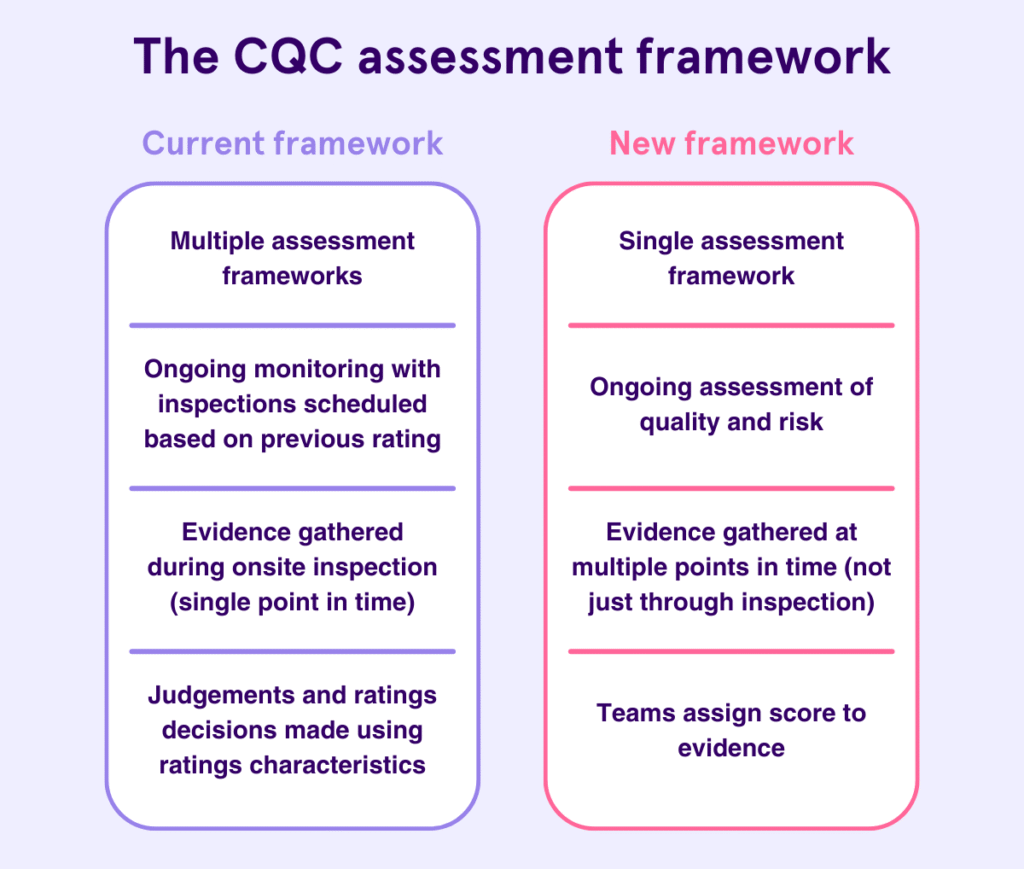
Your First Inspection: What to Expect
CQC usually inspects new domiciliary care providers within the first 12 months of registration. However, inspections can happen sooner if CQC identifies risk.
Inspections focus on the five key questions:
- Is the service safe?
- Is it effective?
- Is it caring?
- Is it responsive?
- Is it well-led?
Inspectors will test whether your service matches your registration documents in practice.
The First 30 Days: What You Should Do Immediately
The first month after registration sets the tone for inspection readiness.
You should:
- implement all policies and procedures in real operations
- begin staff supervision and competency checks
- keep training records up to date
- document care planning and reviews
- log incidents, complaints, and actions taken
Do not wait for inspection to start recording evidence. Inspectors expect to see a working paper trail.
Maintain Compliance, Not Just Documents
Many providers pass registration and fail inspection because policies exist only on paper.
CQC expects to see:
- staff following procedures
- audits being completed
- feedback being collected and acted upon
- risks identified and managed
If your service looks different from what you described in your application, inspectors will challenge it.
Notify CQC of Changes
You must notify CQC about certain changes, including:
- changes to your nominated individual or registered manager
- changes to your registered address or premises
- significant incidents or safeguarding concerns
- changes to the services you provide
Failing to notify CQC is itself a compliance breach.
Keep Your Statement of Purpose Accurate
Your Statement of Purpose must stay current.
If your services change, you must:
- update the document
- ensure policies still align
- notify CQC where required
Outdated Statements of Purpose are a common inspection finding.
Note: Registration confirms that you can provide care.
Inspection confirms whether you do provide it safely and consistently.
Treat compliance as an ongoing process, not a one-off hurdle.
The CQC Registered Providers List: Why It Matters and What to Check
Once CQC approves your application, your service appears on the CQC registered providers list. This is not a formality. It is your public regulatory record.
Commissioners, local authorities, families, insurers, and partners use this register to verify whether a provider is legally allowed to operate.
What the CQC Register Shows
Your public listing typically includes:
- your provider name
- your registered address
- your regulated activities
- your registered manager (where applicable)
- your inspection status and rating (once inspected)
This information becomes part of your public reputation.
Why the Register Matters for New Providers
For a new domiciliary care agency, the register:
- proves you are legally registered
- builds trust with service users and referrers
- allows commissioners to verify compliance
- confirms you can deliver regulated personal care
Many organisations will not engage with you until your registration appears on the public register.
What You Should Check as Soon as You Go Live
When your registration goes live, check your listing carefully.
Confirm that:
- your provider name is correct
- your address matches your legal occupancy evidence
- your regulated activity is listed accurately
- your service description reflects what you applied for
Errors happen. Leaving them uncorrected can cause confusion or delay referrals.
What to Do If Something Is Wrong
If you spot an error:
- contact CQC promptly
- provide clear evidence of the correction needed
- keep records of communications
Do not assume CQC will fix mistakes automatically.
How the Register Connects to Inspection
Once registered, your listing links directly to:
- inspection reports
- ratings
- enforcement history (if any)
Everything CQC publishes builds on your registration record. Accuracy matters from the start.
The Key Takeaway
The CQC registered providers list is your public compliance footprint.
Check it.
Maintain it.
Treat it as part of your professional credibility.
Get Your CQC Registration Right the First Time
CQC registration for domiciliary care providers has changed, permanently.
Since July 2025, incomplete or inaccurate applications no longer move forward. CQC rejects them at the point of receipt. Resubmissions lose their place in the queue. Small mistakes now cost months, not days.
If you take one thing from this guide, take this: CQC no longer fixes applications. They filter them.
Success in 2026 depends on preparation, accuracy, and consistency, not speed.
You must:
- submit the correct documents
- use current forms
- align every answer across your application
- follow submission mechanics precisely
- demonstrate readiness from day one
If any part of your application feels rushed, vague, or incomplete, stop and fix it before you submit.
Need Expert Help With Your CQC Registration?
If you want to avoid rejection, delays, and costly resubmissions, expert guidance can make the difference.
Care Sync Experts supports home care providers across England with:
- end-to-end CQC registration support
- professionally written, service-specific policies
- Statement of Purpose and business plan development
- application review before submission
- registration interview preparation and coaching
- ongoing compliance support after approval
We stay up to date with CQC regulatory changes, submission requirements, and assessment expectations, so you don’t have to learn the hard way.
Book a Free CQC Registration Consultation
If you’re planning to apply, or you’ve already faced rejection, speak to our team before you submit again.
This guide was prepared by Care Sync Experts and reflects current CQC requirements as of 2026. CQC guidance can change. Always verify current requirements with CQC before submitting your application.
FAQ
Is CQC Registration Difficult?
Most applications fail because providers:
CQC registration is not difficult because it is complicated. It is difficult because it is precise.
submit incomplete document packs
contradict themselves across forms and documents
misunderstand what “ready to operate” actually means.
The Care Quality Commission does not assess effort or intention. It assesses readiness and accuracy. If your application is complete, consistent, and specific to your service, registration is achievable. If it is vague or rushed, rejection is likely.
What Are the Different Types of CQC Registration?
CQC registration depends on what regulated activity you provide and how you operate, not on business size.
For domiciliary care, the most common registrations are:
Registered manager registration – required for the person managing day-to-day care delivery
Provider registration – required for the organisation or individual delivering the service
You may also register for different regulated activities, such as:
personal care
treatment of disease, disorder, or injury
nursing care
Each regulated activity carries different expectations and evidence requirements. You must only apply for activities you are genuinely ready to deliver
Do Private Carers Need to Be CQC Registered?
It depends on how the care is arranged.
A self-employed carer does not need CQC registration if:
they are directly employed by the person receiving care, and
they do not operate through an agency or employ other carers
However, registration is required if:
care is arranged through an agency
the carer employs staff
the service provides regulated personal care as a business
Many people get this wrong. Operating as an “independent carer” does not automatically remove the requirement to register
How Often Does CQC Inspect Domiciliary Care Providers?
CQC does not inspect on a fixed annual schedule.
For new domiciliary care providers:
the first inspection usually happens within 12 months of registration
inspections can happen sooner if CQC identifies risk
After that, inspection frequency depends on:
previous inspection outcomes
risk indicators
intelligence or concerns raised
CQC can also carry out unannounced inspections at any time. Providers must remain inspection-ready from the day they begin operating.